
AI customer service: how to automate support without losing customers
Every unanswered message is a small broken promise. The customer asking about an order, the business requesting a quote late on a Friday or the person who cannot find an invoice do not compare your service with your competitor’s: they compare it with the best service they have ever received. AI customer service can close that gap, but it can also widen it when it is deployed as a wall between the company and the person writing. This guide explains how to decide which enquiries to automate, how to design the handover to a person, what it really costs and how to measure whether the change improves the experience rather than merely reducing calls.
What AI-assisted service means in a real business
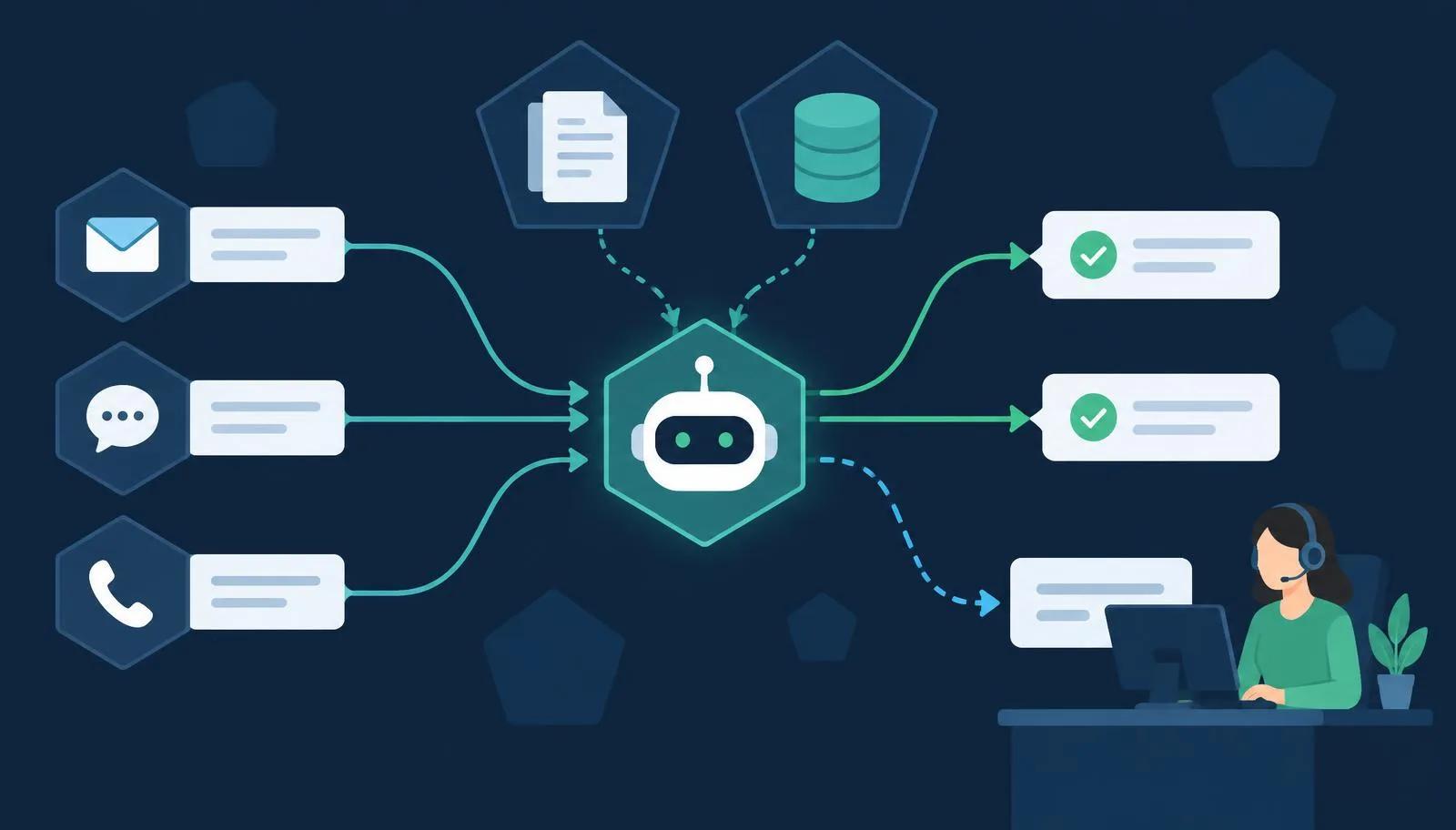
Talking about AI customer service usually brings to mind a chat bubble in the corner of a website. That is only one possibility. In practice, AI can take part at three different moments: before a person reads the message, classifying it and gathering context; during the reply, proposing a draft based on approved information; and instead of the person, directly resolving well-bounded enquiries. Each moment carries different risks and benefits, and almost no business should start with the third.
The difference from old menu-driven assistants is that a language model understands requests written naturally, with typos, mixed topics or incomplete information. “I ordered two boxes on Tuesday and only one has arrived, is the other coming separately?” fits no predefined button, but a well-designed system can recognise a partial shipment, find the order if it is allowed to and reply with the real status. Understanding improves greatly; responsibility for what is said remains with the business.
That is why it helps to think of AI as a layer built on your systems, not a replacement for them. Without access to orders, invoices, contracts or current documentation, the model can only give generic answers or, worse, invent them confidently. With disorganised access, it may show information to someone who should not see it. The quality of automated service depends less on the chosen model than on which information it consults, with which permissions and what it does when it does not know.
Why now: instant expectations and teams that do not grow
Pressure on customer service rarely arrives through one sudden change. It builds up: one more channel, longer hours, a bigger catalogue, customers who email and then call to confirm the email arrived. The team stays the same and each person spends a growing part of the day answering questions already answered a hundred times. The problem is not a lack of willingness; repetitive work pushes out the work that genuinely needs judgement.
At the same time, the technology has matured enough for a small business to consider what was reserved for large contact centres only a few years ago. Current models read documents, follow instructions more reliably and can call tools to look up a status or open a ticket. That does not make every project a good idea, but it changes the question: no longer “is it possible?” but “which part is worth it, and how do we control it?”.
The legal framework has changed too. The European AI Act sets transparency obligations for systems that interact with people, so anyone talking to an AI should be able to know it. On top of that sit the data protection rules that already existed. Far from being a brake, these obligations push towards the design that makes sense anyway: state clearly what is automated, offer a human exit and do not process data you do not need.
Start with an enquiry map, not with a tool
The most common mistake is choosing a platform and then looking for a use. The useful approach is the reverse: take one or two months of real messages and classify them. No sophisticated study is needed; a sheet where each enquiry has a reason, a channel, the approximate time it took and whether it required checking a system is enough. Within hours, patterns emerge that nobody had quantified: perhaps a third of emails are variations of “where is my order?” or “can you resend the invoice?”.
With that map, rank categories by two criteria: volume and risk. Frequent, low-risk enquiries—opening hours, shipment status, standard documentation, sign-up steps—are natural candidates for automatic resolution. Frequent but sensitive ones—changes to terms, complaints involving money, security incidents—call for automated preparation and a human reply. Rare, complex ones almost never justify the automation effort at the start.
Also look at enquiries that should not exist. If many people ask how to download an invoice, maybe the link is hidden. If they constantly ask for order status, maybe a proactive notice is missing when it changes. The best automated enquiry is the one that stops happening because the customer already has the information. A well-framed AI service project often uncovers product and process improvements that cost less than any chatbot.
Which enquiries AI can resolve alone and which it cannot
- Stable, approved information: opening hours, shipping terms, document requirements, steps in a procedure. Answers come from reviewed sources, citing the source where helpful.
- Status enquiries with verified identity: where an order is, whether a document arrived, which stage a request is at. Requires read-only access and checking that the person asking is entitled to know.
- Bounded, reversible actions: resending an invoice to the registered address, rescheduling an appointment within free slots, opening a ticket with the data already collected.
- Better with a person: complaints involving compensation, policy exceptions, visibly upset customers, legal, health or safety matters, and any case where the available information does not add up.
- Never automatic: decisions with significant effects on the person without the possibility of human review, and replies that require data the system should not hold.
The handover design decides the experience
The most important part of an AI service system is not what it answers but how it stops answering. We have all suffered the loop of an assistant repeating the same question while we ask to speak to someone. That moment destroys in seconds the trust a brand took years to build. A well-designed handover is offered early, triggers on natural phrases (“I want to talk to a person”) and does not force the customer to prove the problem is serious enough.
Handing over is not just passing the conversation along. It means passing it prepared: a short summary of the problem, the data already verified, what the AI attempted and why it stopped. The person picking up the case should not ask again for the order number the customer already typed. If the handover means starting from scratch, the customer feels they have wasted their time twice, and the team loses the savings that justified the project.
Outside working hours, the handover must also be honest. It is better to say “someone from the team will review it first thing tomorrow; we already have your enquiry and reference” than to fake a live conversation. Clear expectations reduce frustration and repeat enquiries. And when the AI cannot help, it should say so plainly: “I don’t have that information, I’ll pass you to the team” builds more trust than three friendly paragraphs that solve nothing.
Write down handover triggers before launching anything: words signalling anger or urgency, excluded topics, low confidence in the answer, number of failed attempts, an explicit customer request. Test them with real anonymised conversations. A system that hands over too often can be tuned without harm; one that hands over too rarely causes the mistakes that end in a negative review or a formal complaint.
Knowledge base: the quiet work that makes the difference
A model answering from documents can only be as good as those documents. In many businesses, knowledge is scattered across old emails, a two-year-old terms PDF, the head of a long-serving employee and a website nobody updates. If all that is connected without review, the AI will find contradictions and pick one at random. The customer gets a fluent, wrong answer—the worst possible combination.
Before connecting sources, decide which are official. For each category in the enquiry map there should be a current document, with an owner and a review date. You do not need an encyclopaedia: a few clear pages on shipping, returns, billing and customer onboarding cover much of the volume in many small businesses. Writing them also forces you to resolve internal ambiguities that each person currently interprets their own way.
Keep public and internal information separate. Notes on margins, supplier agreements or exceptions granted to a particular customer should not sit in the same source the public assistant consults. Permission-based separation is more reliable than asking the model to “not mention” certain data: what it cannot read, it cannot reveal. This simple principle prevents one of the most common information leaks in rushed projects.
Finally, turn conversations into continuous improvement. When someone corrects a draft or answers a handed-over enquiry, that reply reveals what was missing from the knowledge base. Reviewing the most frequent handovers weekly and updating the relevant documentation is the maintenance with the highest return. The point is not for the system to “learn by itself” but for the team to have a clear loop so that what is learnt gets written down.
Channels: web, email, WhatsApp and phone are not the same
The channel changes the nature of the enquiry. On the website, people are usually deciding: comparing, hesitating, looking for a quick answer before buying or requesting a quote. There, AI can turn doubts into enquiries, collecting the data the sales team needs to reply with context. In email, messages are longer and mix topics; classification and assisted drafting often add more than automatic replies.
Instant messaging combines immediacy and closeness, which raises expectations: a message answered hours later feels worse than an email with the same delay. When automating it, be especially careful with customer identification, tone and handover hours. Each platform also has its own business terms of use, which must be reviewed before designing the journey.
The phone is the most delicate channel. Voice assistants have improved a lot, but a phone conversation leaves little room to correct a misunderstanding, and many people call precisely because they want to talk to someone. A prudent strategy is to use AI to reduce avoidable calls—proactive notices, clear website information, fast written replies—and keep the phone for human service, perhaps with a prior summary of the enquiry if the customer leaves a recording.
Whatever the channel, everything should end up in a single history. If a customer writes on the website, then emails and later calls, the person serving them should see all three interactions. Unifying the record is often more valuable than adding another automated channel, because it removes the feeling of talking to departments that do not know each other.
Service as part of the sales funnel
Customer service is usually treated as a cost to contain. Yet many messages reaching a business are opportunities dressed as questions: “do you work with companies in my sector?”, “how long would it take?”, “does this integrate with what we already use?”. If those questions get a generic or late answer, the visitor moves to the next browser tab. If they get a useful answer and a concrete invitation to continue, they become sales conversations.
A well-designed assistant can answer what it knows reliably and, when it detects buying intent, collect what the team needs: type of company, approximate volume, timeframe, current systems and preferred contact method. The key is not to turn that collection into an interrogation. Three or four relevant questions, asked at the right moment, are worth more than a fifteen-field form that half of visitors abandon.
The link to sales follow-up closes the loop. An enquiry that arrives prepared, with a summary and a suggested priority, can be assigned in minutes and receive a personal reply the same day. That is where AI adds value beyond savings: answering faster and better than competitors to someone who is deciding. For many service businesses, that speed advantage is the difference between winning the project and never even being considered.
From a visit to the next sales step.
Let’s review how enquiries reach you, who responds and what information your team needs to move each opportunity forward.
How much AI customer service costs
The cost has three components worth separating. The first is usage: platform licences or model consumption by volume of text processed. For most small businesses this is the smallest part and the easiest to estimate from the enquiry map. The second is implementation: preparing the knowledge base, connecting systems, designing the handover, configuring permissions and testing. The third is maintenance: reviewing conversations, updating documents and adjusting rules when products or terms change.
Packaged solutions reduce initial implementation but often limit integrations and control over where data is processed. Custom development costs more at the start and fits better when service depends on in-house systems—an ERP, a customer portal, a particular order database—or when privacy requirements are strict. Often the reasonable option is mixed: a standard tool for the channel and a custom layer connecting the data that makes answers useful.
To assess the return, compare the total first-year cost with recovered time and with the value of answering better. If the team spends, say, several hours a day on repetitive enquiries, a partial but sustained reduction can already justify a pilot. But remember the other side of the scale: a poor implementation can create extra enquiries, complaints and lost customers. Savings only count if satisfaction does not get worse, and that must be measured from day one.
Metrics that genuinely show whether it works
The most quoted metric—percentage of conversations “resolved” by AI—is also the most misleading. A conversation may count as resolved because the customer got tired and closed the window. That is why it helps to measure confirmed resolution: cases where the customer says the answer helped, or does not write again about the same topic within a reasonable period. It is harder to calculate but reflects what matters.
Alongside it, track time to first useful answer (not the first answer, which an AI always gives in seconds), total resolution time, handover rate by category and recontact rate. Add a quality signal: a weekly sample of conversations reviewed by a team member against simple criteria—accuracy, tone, whether it handed over when it should. And for sales enquiries, measure how many end in a qualified request.
Set a baseline before changing anything. If you do not know how long you currently take to reply or how many enquiries arrive per category, any improvement is just an impression. With two to four weeks of prior data and the same measurement method afterwards, the comparison is honest. So is recognising when an automated category does not work and returning it to the team: withdrawing an automation that worsens the experience is a quality decision, not a failure.
Privacy, transparency and compliance without drama
Customer service handles personal data almost by definition: names, emails, addresses, purchase histories and sometimes sensitive information customers share unprompted. Before automating, review with whoever manages data protection in your business which legal basis covers each processing activity, where data is processed, how long conversations are kept and which providers are involved. A data processing agreement with each provider is not an optional formality.
Transparency is easy to apply and pays off in trust. State at the start that the person is talking to an automated assistant, explain what it can do and how to ask for human service. Avoid names and photos suggesting a real employee. It is not only about meeting an obligation: customers tolerate a system’s limits far better when they know from the outset that it is a system.
Minimise what the system sees and keeps. If checking an order only requires its number and postcode, there is no need to expose the customer’s full history. If a conversation contains data that should not be there, you should be able to delete it. And if an automated reply could significantly affect the person—denying a return, applying a penalty—a human must be able to review the decision. Designing it this way from the start costs little; fixing it later costs a lot.
Common risks and how to avoid them
- Invented answers: restrict replies to approved sources, require it to say when it does not know and test with questions whose answer is not in the documentation.
- Promises the business cannot keep: explicitly prohibit commitments on deadlines, prices or compensation that do not come from a system or an authorised person.
- Manipulation through user instructions: separate system instructions from customer text and do not grant the assistant permissions it does not need.
- Information leaks: control by permissions which data it can consult and verify identity before showing account information.
- Inappropriate tone: define a concrete brand voice, with examples, and pay special attention to conversations with upset customers.
- Silent drift: review periodic samples and repeat tests when the model, documentation or process changes.
An example of a complete journey
Imagine a professional supplies company with a three-person service team. On a Tuesday at 21:40, a customer writes through the website: part of an order is missing and she needs the material on Thursday. The assistant introduces itself as automated, asks for the order number and postcode, and checks the status in the management system with read-only permissions. It sees the order left in two shipments and the second is due on Wednesday.
The assistant explains that the order was sent in two parts, gives the tracking number of the second shipment and the expected date shown in the system. It does not promise it will arrive in time, because that depends on the carrier; it points to where progress can be checked and offers to leave a note for the team in case she wants confirmation. She accepts. The system creates a note with the summary, order and contact preference, without her repeating anything.
At 8:30, a team member sees the note, checks with the carrier that the shipment is on schedule and replies with a short, personal message. Had there been a delay, they could offer an alternative the AI is not authorised to decide. The outcome: the customer got useful information instantly, received human confirmation first thing and the team spent two minutes instead of ten. AI did not replace service; it prepared it.
Signs your business is ready, and signs it is not yet
There are clear signs that an AI service project has good odds. The first is repeated volume: if a visible share of enquiries closely resemble each other, there is material to automate. The second is that the information needed to answer already lives in some system—orders, invoices, appointments, case files—even if today it must be looked up by hand. The third is that someone on the team can spend a few hours a week reviewing results during the pilot. Without that person, no system improves.
There are also signs that it is better to wait or start elsewhere. If every enquiry is unique and depends on negotiation, AI will add little beyond sorting the inbox. If terms change every week and nobody documents them, the assistant will repeat outdated information. If customer data is duplicated across several spreadsheets with no reliable source, the first useful project may be tidying that data. And if management expects to eliminate the service team within a quarter, the plan starts from an expectation that usually ends in disappointment.
Between the two extremes lies the most common situation: an overloaded team, useful but scattered information and a handful of enquiries that repeat endlessly. At that point the value lies not in a spectacular platform but in a modest journey done well: two automated categories, a flawless handover and a single record. That first success, measured honestly, is what provides the arguments to widen the scope and gives the team the confidence to use it every day.
How to run a pilot in six weeks
Weeks 1 and 2: data and scope
Classify recent enquiries, set the baseline and choose two or three frequent, low-risk categories. Review and write the official documentation covering them. Decide which systems need to be consulted and with what minimum permissions. Write down handover triggers, excluded topics and the transparency text.
Weeks 3 and 4: build and shadow mode
Build the journey and test it with real anonymised conversations, including difficult ones. Then switch it to shadow mode: AI prepares drafts the team reviews before sending, with no direct customer contact. Errors are caught without risk and the team gets used to the tool. Record every correction and its cause.
Weeks 5 and 6: limited launch and decision
Open automatic replies only for the categories that passed shadow mode, in one channel and with handover active. Review daily at first and weekly afterwards. At the end, compare with the baseline: time to first useful answer, confirmed resolution, recontact, handovers and team feedback. Those figures decide whether to expand, adjust or stop.
Frequently asked questions
Will AI replace my service team? In most small businesses that is not a reasonable goal. What usually changes is how work is divided: less time on repeated questions and more on cases requiring judgement, key customers and process improvement. A small team with good automated preparation can handle more volume at better quality.
Do I need a website chatbot to start? Not necessarily. Classifying emails and proposing drafts to the team can add more value with less risk, because a person reviews before sending. A public chat makes sense once reliable documentation exists and there is a clear pattern of frequent questions on the website.
What if the AI gets something wrong with a customer? That is why design matters: limit what it can answer, prevent promises, hand over when in doubt and review samples. If an error occurs, it should be easy to find the conversation, fix the source that caused it and contact the customer. Traceability is part of the system, not an extra.
Does it work across languages with international customers? Current models handle several languages well, but official documentation and handover must be prepared for each. Answering in one language and handing over to a team that does not speak it causes avoidable frustration. Start with the main language and expand with specific testing.
The next step: your enquiry map in one conversation
If after reading this guide you recognise that your team answers the same questions every day, that some sales enquiries go cold for lack of a quick reply or that information is spread across too many places, you already have a starting point. You do not need to arrive with a chosen solution; knowing which enquiries arrive, through which channels and which systems are involved in resolving them is enough.
You can try the AI assistant demo to see how an enquiry is answered from approved information and handed over when needed, using fictional data. And if you want to assess your own case, tell us about it in the assessment: we will review which categories make sense to automate first, which are better left with the team and how to measure the outcome from day one.
Technical references and editorial scope
Original Pentatronik content. These sources support the technical concepts; examples and calculations are illustrative, not client results or guarantees.
See it in action
Walk through a guided demo with fictional data, or tell us your case and we’ll suggest where to start.