
AI document management for businesses: a practical guide to filing, extracting and finding files
Hardly any business decides one day to have a document problem. It creeps in gradually: first a few shared folders on a server or Drive, then email attachments only one person can see, then scanned invoices with cryptic file names, renewed contracts in conflicting versions and delivery notes buried in chat threads. When the team grows or an audit arrives, tracking down a single file eats hours nobody budgeted for. AI document management tackles that bottleneck at the two points where traditional setups always break down: filing every document without relying on manual discipline and using the data inside it without retyping it from one system to another.
Why shared folders stop working once a business grows
In the early years of a small business, a folder tree in Google Drive, OneDrive, SharePoint or a local file server feels enough. The team is small, almost everyone knows the main clients and, if a file is missing, you ask the person at the next desk. The issue is not the storage tool itself, but the fact that a shared folder depends entirely on human discipline every single time a file is saved.
As soon as client volume grows, several departments touch the same case or staff changes in admin, familiar symptoms appear. One person files contracts by year, another by client and a third by supplier. Files arrive named `scan_0412.pdf` or `Quote_final_v3_OK_revised.pdf`. When someone needs to verify a clause, a renewal date or an amount, they open six different files to find the right one — or ask the client to send it again.
That disorder carries a quiet cost that rarely shows up on a profit-and-loss statement, yet is felt every day: hours spent hunting for files, figures typed two or three times across email, spreadsheets and ERP, missed contract renewals, expired supplier certificates and month-end closes slower than they need to be.
What AI document management actually is (and how it differs from cloud storage)
Cloud storage holds files; document management software governs their lifecycle: how they enter, which metadata describes them, who may view or approve them, which version is current and when they should be archived or deleted. Adding artificial intelligence does not mean bolting a generic chatbot onto a folder; it means removing the mechanical work that used to make traditional document systems collapse under their own weight.
In classic document systems, someone had to upload each PDF and fill in eight fields by hand: document type, client, tax ID, date, project, amount and owner. Under daily pressure, teams left those fields blank and the system turned into another dumping ground. With intelligent document management, the system reads the file on arrival, proposes the category and key fields, applies business rules and only asks a person to step in when it spots doubt or an exception.
- Metadata instead of deep folder trees: the same contract can be found by client, tax ID, expiry date or service type, without duplicating the file across four folders.
- Single version and traceability: the system logs who uploaded the file, what was extracted, who validated it and when it was last changed.
- Workflows tied to operations: receiving a document can trigger an alert, update a case file or prepare an accounting entry, instead of sitting idle in an inbox.
The four capabilities AI brings to document management
When discussing document process automation, it helps to separate four distinct capabilities. Not every company needs all four on day one; understanding what each does helps you prioritise and avoid paying for flashy features nobody will use.
1. Smart OCR and reading of variable layouts
Legacy OCR relied on rigid templates: if a supplier moved its logo or sent a phone photo, extraction broke. Current models combine optical recognition with layout understanding to read native PDFs, scanned pages, complex tables, stamps and mobile photos, even when every supplier uses a different design.
2. Automatic classification and document splitting
It is common to receive a single twenty-page PDF mixing an invoice, two signed delivery notes and a tax clearance certificate. AI can split the bundle into separate documents, identify each category, rename it cleanly and attach it to the right client or project.
3. Structured data extraction and rule validation
Reading text achieves little if someone still has to copy it by hand. The real productivity gain comes when the system extracts structured fields — tax ID, dates, amounts, VAT, withholdings, order number, expiry or key clauses — and cross-checks them automatically against your database to verify whether the supplier exists, whether the amount matches the quote or whether the file is a duplicate.
4. Semantic search and querying with verifiable citations
Searching by file name fails the moment nobody remembers how the PDF was titled. Semantic search lets you ask in plain language — for instance, which active maintenance contracts expire next quarter or what penalty terms appear in a specific client agreement — and get an answer backed by the exact excerpt and a link to the source document.
Which document types to automate first in an SME
Trying to migrate a company’s entire document archive in a first phase usually stalls progress for months. The most profitable approach is to start with the two or three document families with the highest repetitive volume or the highest operational risk if lost or expired.
- Supplier invoices, receipts and delivery notes: steady monthly volume, predictable fields and immediate return when matching amounts against orders and preparing accounting entries. If this is your biggest daily bottleneck, it pairs naturally with our guide on how to automate invoices with AI.
- Commercial contracts, addenda and renewals: lower volume, high financial impact. Extracting expiry dates, notice periods, price-index clauses and owners prevents unwanted renewals or unbilled work outside scope.
- Client case files and recurring paperwork: standard across advisory firms, law practices, engineering companies, contractors and B2B service firms. Tracking what is missing, what is approved and what expires saves dozens of follow-up emails.
- HR paperwork, health-and-safety and subcontractor compliance: social security and tax certificates, liability insurance, training records and onboarding forms. One expired certificate can block site access or create legal liability.
- Quotes, technical sheets and tender specs: extracting line items, terms and deadlines speeds up proposal work and stops commercial know-how from being locked inside old files.
How an AI document workflow operates step by step
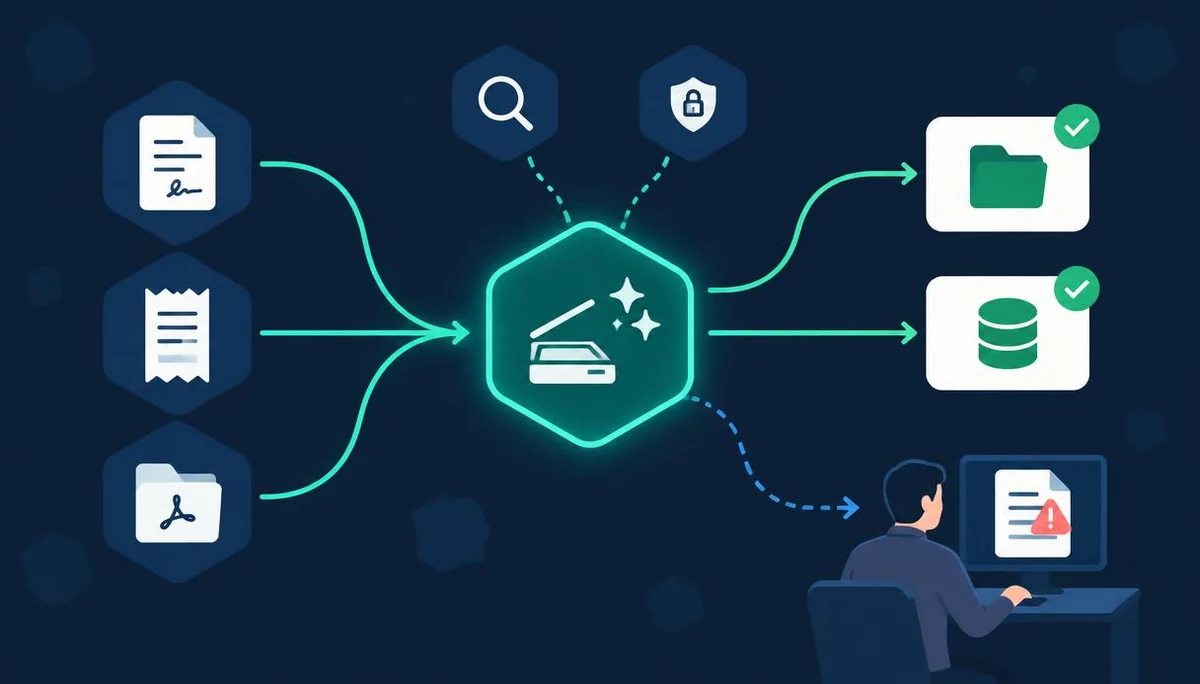
A solid rollout is designed as a clear five-stage chain where every step leaves an audit trail and has measurable checks. You do not need to force clients or suppliers to change how they send files for the workflow to start delivering value.
Step 1: Frictionless multichannel capture
Documents enter from the channels they already use today: a dedicated mailbox (such as invoices or admin), an office scanner dropping files into a watched folder, a mobile upload or a client document portal where each client submits files into their own case.
Step 2: Reading, classification and normalisation
The engine analyses the file, splits bundled pages if needed, identifies the type and extracts the metadata defined for that category. It also computes a per-field confidence score to tell crisp readings apart from blurry or ambiguous values.
Step 3: Validation against business rules
This is where automation earns trust. Before accepting anything, the system runs deterministic checks: is the tax ID valid and linked to an active supplier?, does net plus VAT minus withholding match the total?, does that document number already exist for the same issuer?, is the certificate expiry date still in the future?
Step 4: Exception queue for human review
Every document that passes the rules and confidence threshold flows straight to filing or the next stage. Only discrepant cases — a new supplier, an out-of-range amount, an illegible page or a bank account change — stop in a review queue showing the document beside the flagged fields. A person corrects or approves in seconds instead of retyping the whole file.
Step 5: Permissioned filing and system integration
Once validated, the file is stored with a consistent name, indexed metadata and role-based permissions, while the structured data flows into your ERP, CRM, accounting software or renewal calendar. Anyone checking that case months later sees both the structured record and the original file in one click.
Semantic search and AI querying over your own documents (the RAG approach)
One of the most requested capabilities in 2026 is asking questions across a company’s internal documentation as if talking to a colleague who has read every case file. Technically, this is solved with retrieval-augmented generation (RAG): the system does not train a public model on your files; instead, it retrieves the exact relevant passages from your repository first and instructs the model to answer strictly from those passages.
For AI search to be trustworthy in a business — rather than a liability — it must meet four non-negotiable conditions:
- Permissions enforced before retrieval: if a salesperson has no access to payroll or executive contracts, the search engine must never retrieve those files when building an answer. Permissions are filtered in the retrieval layer, never via a text prompt to the model.
- Direct citations to document and page: every material claim must link to the exact file and paragraph so anyone can verify the original wording before acting on it.
- Willingness to say “not found”: when a fact is absent from authorised documents, the assistant must state there is no evidence rather than filling the gap with guesses.
- Version awareness: superseded versions of a contract, price list or procedure must be excluded from default search (and kept only in history) so answers never quote outdated prices or terms.
Where a person must always stay in the loop
The biggest mistake when pitching document automation is promising “zero human intervention”. In real business operations, the goal is not to strip people of control, but to strip away mechanical work so their attention stays on decisions with financial or legal consequences.
- Bank account or tax detail changes: any invoice showing an IBAN different from the supplier’s stored account must pause until verified by a person through an independent channel. It is a basic defence against impersonation fraud.
- Interpreting legal clauses or penalties: AI excels at locating and summarising a termination or exclusivity clause, yet the legal or commercial call always belongs to an accountable person.
- Approving payments and binding filings: extraction and pre-matching are automated; payment release, contract signing and official regulatory submissions keep explicit human approval.
- Low-quality scans or unseen exceptions: cropped scans, messy handwriting or new document layouts must route automatically to the review queue.
Internal document management vs a client document portal
Many SMEs blur two complementary needs and end up buying a tool that solves only half the problem. It helps to distinguish between the internal repository (how your team organises, searches and processes files) and a client document portal (how you request, collect and validate paperwork sent by people outside the company).
If the bottleneck sits inside — supplier invoices, company contracts, procedures, scattered historic files — the priority is structuring the internal repository and automating extraction. If daily friction comes from chasing clients or subcontractors by email for IDs, deeds, certificates or quarterly paperwork, the biggest relief comes from a client portal with checklists and automatic reminders.
When both pieces are designed together, the loop closes: the client uploads a file in the portal without touching your internal network, AI checks on the spot whether it is the right document and still valid, and once approved it enters the internal case file and updates your management system. You can explore that submission and review flow in our document portal demo.
A portal that fits the way you work.
Tell us which documents, tasks and users you need to coordinate. Your workflow is the starting point for defining suitable custom software.
Document management software: commercial SaaS, open source or custom build
Choosing a platform is not about hunting for “the best software on the market”, but finding what fits your volume, recurring budget and existing systems. In practice, SMEs face four distinct paths:
1. Extended office suites (SharePoint, Microsoft 365, Google Workspace)
If you already pay for Microsoft 365 or Google Workspace licences, using structured libraries with clear permissions and API-connected extraction flows can be the fastest route. Limits appear when you need a smooth portal for external clients, complex case rules or deep ERP matching.
2. Specialised SaaS document management platforms
Established tools such as DocuWare, Athento or ERP document modules offer proven workflows and standard support. They work well when your operations fit their templates, though you should examine pricing per user, per processed page and per connector, as well as how easily you can export files and metadata if you ever switch providers.
3. Self-hosted open-source tools (Paperless-ngx, Nextcloud)
For businesses wanting full control over where files live and aiming to avoid escalating per-user licences, pairing Nextcloud or Paperless-ngx with workflow automation (for example with n8n) and controlled AI models provides a very solid foundation. In return, it requires clear ownership for maintenance, backups, updates and security.
4. A custom layer connected to your existing systems
Many SMEs do not need to rip out their ERP or change email: they need a custom document layer that ingests files, applies their exact validation rules, gives clients or suppliers a clean portal and writes validated records into the ERP or CRM they already run. This route is often the most cost-effective when document handling sits at the heart of the service you sell.
How to integrate document management with your ERP, CRM and email without creating a new silo
A document system disconnected from the rest of the business forces staff to maintain two systems in parallel and ends up abandoned within six months. The key is defining the source of truth for each piece of data before connecting anything.
- Your ERP or CRM owns master records: clients, suppliers, projects, accounting codes and deal stages live in your core management tool. The document system queries those records via API to validate and suggest tags, avoiding duplicates under slightly different spellings.
- The document system owns the file and audit trail: the original PDF, versions, extraction metadata and approval log live in the repository, while the ERP stores a stable link to the file rather than duplicating gigabytes of attachments.
- Email and messaging as intake channels, not archives: rules automatically capture relevant attachments from shared mailboxes, confirm receipt and file the document where it belongs so nobody has to dig through Outlook or Gmail for a contract again.
Privacy, GDPR and legal retention periods in Spain
Business documents concentrate the most sensitive information a company holds: payroll, client IDs, signed contracts, accounts, bank details and legal or clinical reports. Deploying AI on top of that archive means treating compliance as part of the technical design, not an afterthought.
- Where AI processes documents: always use business APIs with contractual no-training commitments, or deploy on European infrastructure or private AI when files contain special-category data or professional secrecy. We examine those architectures in detail in our guide to private AI for businesses.
- Minimisation and access control (GDPR): least-privilege access means each role only sees the document families required for its work. Keeping logs of views, downloads and deletions is equally important.
- Retention schedules and scheduled deletion: in Spain, Article 30 of the Commercial Code requires keeping commercial books, correspondence and supporting records for six years from the last entry, while tax legislation sets a general four-year limitation period (which can be interrupted or extended in specific cases such as carried-forward losses or capital goods). Conversely, keeping CVs or ID copies indefinitely without a legal basis breaches GDPR. A sound repository applies retention policies per document type to prevent premature deletion and flag or purge files that should no longer be kept.
- Transparency and oversight under the EU AI Act: documenting which automations touch client or employee files, which model provider is involved and what human checks exist makes it far easier to answer audits or client enquiries.
Common mistakes that derail document management (and how to avoid them)
Many document projects are bought enthusiastically and only half-used a few months later. Almost always, the same five planning mistakes are behind it:
- Migrating ten years of chaos blindly: dumping hundreds of thousands of messy legacy files before validating the new workflow burns weeks and delays value. Start with incoming documents from a cut-off date and migrate from history only what is active or legally required.
- Designing an overly complex taxonomy: with forty categories and fifteen mandatory fields, even AI hesitates more often and staff resent the review queue. Start with five to eight clear document types and only the metadata genuinely used for search or integration.
- Leaving admin and operations out of the design: if leadership or IT picks a tool without sitting down with the people who open invoices and chase delivery notes every morning, critical day-to-day exceptions get missed.
- Trusting without testing on real documents: every demo looks flawless on three clean PDFs. Before going live, test against fifty to a hundred real files from your business, including crooked scans, multi-page invoices and handwritten notes.
- Skipping the adoption plan: changing where files live takes a twenty-minute hands-on walkthrough per team and gradually retiring old parallel folders so nobody keeps working “the old way”.
What to measure to verify whether the investment pays off
Before turning on any automation, take a simple baseline over one normal working week. Without a baseline, three months later things may feel smoother, yet you will lack hard numbers to justify the next phase.
- Minutes per processed document: how long it takes today to receive, classify, key data and file an invoice, delivery note or case file, compared with the average after automation.
- Straight-through rate (no manual edits): what share of documents passes automatic checks without requiring edits in the review queue.
- Time to locate a document: how many minutes it took to assemble a client’s paperwork or answer an audit compared with metadata or semantic search.
- Incidents prevented: duplicate documents caught before payment, renewals flagged on time and expired certificates spotted before halting a delivery.
What determines the cost of implementing AI document management
The budget for a document management project varies widely depending on your starting point and integration depth. To budget rigorously — just as we break down in our guide on how much custom software costs — separate three buckets: initial implementation, variable AI or storage usage, and ongoing maintenance.
- Number of document families and extraction complexity: automating invoices and delivery notes alone is far more contained than parsing varied contracts, deeds and technical tenders with dozens of fields.
- Third-party integrations: connecting to a modern ERP with a documented API costs a fraction of integrating legacy software without connectors where scheduled file exchanges are needed.
- External portal vs internal-only use: adding secure access for hundreds of clients or suppliers with checklists and reminders expands scope compared with a purely internal workflow.
- Privacy and hosting requirements: standard EU-hosted business APIs have a very modest variable cost per thousand pages; running models on dedicated private servers raises fixed infrastructure cost and mainly pays off at high volume or under strict confidentiality requirements.
Practical scenario: how daily operations change in a service firm or advisory practice
Picture a technical services firm or advisory practice of around eighteen people managing two hundred active clients. Every month roughly four hundred invoices and receipts arrive, along with around one hundred and twenty client documents (certificates, contracts, deeds and addenda) and dozens of emails asking whether anything is still missing.
Before the change: two admin staff spend twelve to fifteen hours a week downloading attachments, renaming files, keying figures into the management system and sending reminder emails for missing paperwork. When a consultant or technician needs to check a term agreed last year, they dig through email or interrupt admin.
After a phased AI document management rollout: clients upload files in a simple portal and invoices arrive in the connected mailbox. The system classifies each file, extracts tax IDs, dates, amounts and expiry dates, catches duplicates and validates against the client record. Roughly three out of four documents are filed and prepared without manual intervention; the rest appear grouped in a review queue cleared in minutes a day. Contract and certificate renewals alert thirty days ahead, and the team checks any case file via metadata filters or natural-language search linked straight to the source page.
The most valuable outcome is rarely cutting headcount: it is handling thirty to forty per cent more clients with the same team, closing the month without last-minute scrambles and presenting a far more organised operation to clients and auditors.
A six-week implementation plan without disrupting operations
An orderly rollout does not require halting daily work or taking a leap of faith. In six weeks you can move from scattered folders to a real pilot running on live production documents:
- Week 1 — Document map and baseline: list intake channels, pick two priority families, gather a hundred real sample files and measure current handling times.
- Week 2 — Minimal taxonomy, permissions and rules: define categories, mandatory fields, GDPR retention policy, access roles and which exceptions require human review.
- Weeks 3 and 4 — Workflow setup and real-sample testing: enable capture, AI extraction, deterministic checks and the review queue; tune confidence thresholds until accuracy is stable across the sample.
- Week 5 — Integration and controlled pilot: connect to your ERP, CRM or accounting software and run alongside two or three key users to polish real-world edge cases.
- Week 6 — Go-live and metrics review: train the rest of the team, phase out old manual routes for those families and compare real figures against Week 1’s baseline before scoping the next phase.
Frequently asked questions before implementing AI document management
Does it work if we receive poor-quality scans or mobile photos?
Yes, provided the text is legible to the human eye. Current multimodal models perform far better than legacy OCR on creased pages, stamps or uneven lighting. When an image arrives cropped or blurry, the confidence threshold automatically routes it to human review or requests a clearer copy.
Do I need to replace Google Drive, SharePoint or my current ERP?
Not necessarily. In many cases the solution builds on storage you already pay for or adds an intermediate capture, extraction and portal layer that feeds your current ERP without forcing a full company migration.
Can AI “make up” an amount or a clause?
A poorly configured model can make mistakes, which is why it never runs unchecked. Extraction is validated against arithmetic rules and your master records (VAT sums, valid tax IDs, existing orders), and semantic search answers always include direct citations to the source document and page.
What about the confidentiality of our documents and our clients’ files?
Deployments use business environments with zero model training on your data, encryption in transit and at rest, role-based permissions and EU hosting — or dedicated private infrastructure when your sector requires it.
When should we start with a client portal vs internal automation?
If you lose more time chasing files from clients or subcontractors, start with a document portal featuring reminders and validation. If files already arrive but reading, filing and posting them is the bottleneck, start with internal capture and extraction.
What is the next step if we want to evaluate our case?
The most useful step is reviewing real examples of which documents enter your business today, where they stall and which systems you already use. You can first explore an organised review flow in our interactive document portal demo or request a free, no-obligation assessment to scope a contained first phase with measurable return.
Technical references and editorial scope
Original Pentatronik content. These sources support the technical concepts; examples and calculations are illustrative, not client results or guarantees.
See it in action
Walk through a guided demo with fictional data, or tell us your case and we’ll suggest where to start.