
AI agents for businesses: use cases, costs and how to start
Your team does not need another fluent chat window. It needs prepared enquiries, organised documents and difficult cases that do not fall through the cracks. AI agents for businesses can help connect those pieces, but only with a concrete goal, reliable data and clear boundaries. This guide explains how to distinguish a useful opportunity from an exaggerated promise, which costs to examine and how to frame a first project whose value can be measured.
AI agents for businesses: what they are and when they make sense
An AI agent is a system that uses an artificial intelligence model to choose and coordinate steps within a bounded objective. It can interpret a request, consult authorised information and use tools to prepare or carry out an action. The important word is not “autonomous” but bounded: it needs to know what it may do, which data it may use and when it must stop. It is not a digital person to whom you hand the keys to your business.
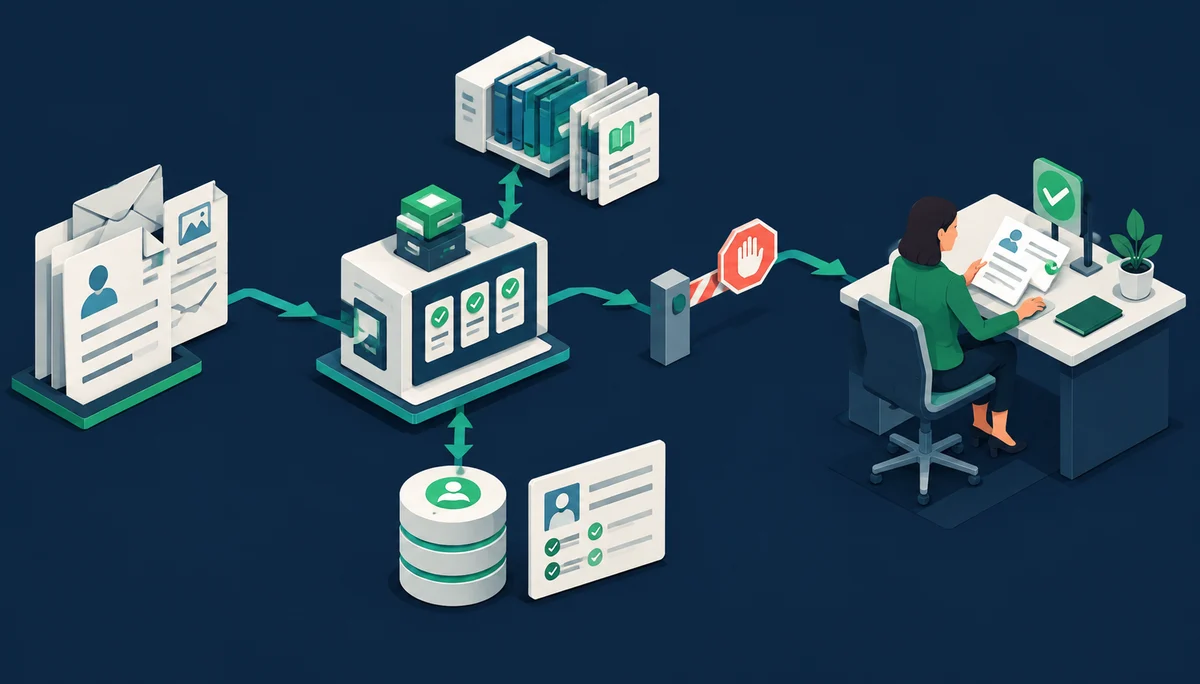
Think of an enquiry arriving through your website: “I need to manage client documents, we are a team of eight and we use an ERP.” A form stores the message. Conventional automation alerts the team. An agent could recognise the problem, check whether the contact already exists, summarise the need and suggest follow-up questions. It performs authorised actions through controlled connections, not because the text of its answer says that it performed them.
The opportunity appears when part of the work requires interpreting language or choosing among known paths. If clear rules solve everything, a traditional workflow is usually easier to maintain. If a decision involves a financial commitment, a sensitive exception or insufficient information, keep it with a person. Choosing not to use an agent can also be a good automation decision.
Chatbot, assistant, automation or agent: do not buy the label
A chatbot mainly describes an interaction format: conversation. Behind it may sit a response menu, a model that searches documents or an agent connected to tools. That is why “chatbot versus agent” is not always a genuine opposition. An agent can operate through chat, work from an email or take part in an internal process without any visible conversation. Ask what the system does rather than what it is called.
An assistant helps a person write, search or summarise. Automation executes a defined sequence: receive an enquiry, validate it, store it and send an alert. An agent introduces model-supported selection of steps within established limits. These pieces can work together: a stable workflow organises the journey, AI interprets a message and a dashboard lets someone approve a proposal. The solution does not need to be entirely “agentic”.
To evaluate a proposal, ask for three things to be identified separately: what rules resolve, what AI interprets and what a person validates. If the explanation is only a convincing conversation, you still do not know whether records will be reliable, permissions correct or recovery possible when the connection to your management software fails. A useful demonstration also shows a case it cannot complete.
Why the topic matters now, without chasing every announcement
Interest in AI agents has a practical explanation: models can combine language understanding with calls to tools. The question is no longer just how to obtain better text, but how to connect that interpretation to work that must be recorded. However, the existence of a product feature does not prove that your process is viable, profitable or safe. Vendor terms, integrations and model behaviour need to be checked when you purchase.
For a small business, useful currency is not choosing the model announced this week. It is checking whether you can now remove a specific delay: prepare a case file, collect information for a reply or make an order ready for validation. Designing around your data and a verifiable outcome allows model changes with less dependence than building everything around one brand. No change should enter production without repeating the relevant tests.
A complete example: from sales enquiry to prepared opportunity
Imagine a service business that receives website enquiries and then works in a CRM. Today someone reads the message, searches for an existing record, copies the context, assigns an owner and asks for missing information. Sometimes two people open the same enquiry; sometimes a valid request waits because nobody identifies who should handle it.
The proposed journey starts with form validation and storage of the enquiry. The system then searches for matches using defined rules rather than a model assumption. AI summarises what the visitor said, distinguishes an operational need from a commercial request and prepares a suggested classification. The CRM receives validated fields and a reference to the original enquiry. If there is not enough information, the case remains pending.
The receipt confirmation can come from a controlled template: acknowledging a message does not require the model to invent a reply. The draft for the salesperson, however, can include three specific questions about volume, systems and goals. A person decides whether to send them and how to continue. This automates preparation without promising a price, a meeting or a capability nobody has confirmed. The contact still has a human owner.
Success is checked against the outcome: enquiries recorded once, faithful summaries, correctly assigned owners and less preparation time. “The agent answered” is not enough. If it creates many drafts that need rewriting, or classifies quickly but incorrectly, the work has not decreased. Before extending the journey, observe what happens with ambiguous enquiries and those that arrive outside working hours.
Where agents fit: documents, operations and service
In document management, AI can identify the type of document received, extract information and flag what is missing from a case file. The system checks fields and applies the permissions of the relevant client. A person reviews a contradictory date or an unrecognised document. The value is not “reading every file”, but giving the team an orderly exception queue so it need not inspect every incoming item with the same intensity.
In operations, an agent can prepare tasks from a free-form request, locate a procedure and suggest which team should handle it. Keep statuses, dates and dependencies in explicit rules. It should not invent a delivery date to finish the journey. When several systems are involved, you need to know which one is authoritative for each item of data and what happens when one is temporarily unavailable.
In customer service, a good first application is supporting the team: search for an answer in approved documentation, consult an authorised status and draft a reply. Automatic public replies require additional limits and a clear route to a person. If a complaint includes conflicting information, the appropriate outcome may be to acknowledge that it needs review, not to continue the conversation until a plausible explanation emerges.
In administration, many improvements do not require a full agent. Reading an invoice with AI, checking amounts with rules and presenting it for review may be a more predictable workflow. Reserving dynamic tool selection for steps where it adds value avoids complicating a sensitive process. A serious proposal should explain why it needs an agent instead of justifying every task with the technology it wants to sell.
How to choose the first process without starting too big
Look for frequent work with a recognisable input, a concrete outcome and someone who can validate whether it is correct. “Improve service” is too broad. “Prepare a summary of document enquiries and assign them for review” is measurable. A short journey that repeats often is preferable to a spectacular exception that happens three times a year. The pilot must represent real work, not only a favourable scenario.
Before choosing, note monthly volume, manual time, the number of systems, common exceptions and the cost of getting it wrong. Then ask what information is available and whether you have permission to use it. A high-volume process can be a poor first choice if it depends on inaccessible documents, contradictory criteria or unresolved authorisations. Data preparation is part of the project even when it does not appear in the demo.
A practical criterion is to start where AI prepares and a person confirms. This makes it easier to compare new work with the previous method, collect corrections and adjust rules without granting irreversible permissions. It does not mean every review must remain forever; it means autonomy is earned through evidence on a bounded case. If you cannot explain how to return to the manual process, an important decision is still missing.
Data and RAG: finding information is not the same as being right
RAG is a technique that retrieves information from a source before generating a response. For example, it searches for relevant passages in internal procedures and provides them to the model as context. It can improve an assistant’s usefulness, but does not guarantee correct answers. If it finds an old price list or the wrong client’s document, immaculate wording will still be a bad answer. You need to control what is retrieved and for whom.
Organise the document base first: an owner for each item, current version, review date and access rules. Separate approved documents from drafts and define which source takes precedence when there is a conflict. For order statuses, balances or availability, consulting the authorised operational system is usually better than using a copy of an old spreadsheet. The agent must be able to recognise that it lacks a sufficient source.
Permissions must apply before information reaches the model, not just by hiding a button on screen. One client must not retrieve another client’s documents because their query includes a similar name. Also distinguish content from instructions: text inside a document has no authority to change the system’s rules. These checks are part of security, not an optional improvement for a later phase.
Permissions and human approval: deciding where autonomy ends
Separate capabilities into reading, preparing and executing. Reading an enquiry’s status is not the same as changing it; preparing a quote is not sending it; detecting an invoice is not approving its payment. For every tool, define permitted operations, accessible data and approval conditions. Credentials with general access to email, CRM and accounting turn a small mistake into a much larger risk.
Useful approval shows what will happen, to which record and with which data. A generic “accept” button without context encourages rubber-stamping. The reviewer should be able to correct, reject or route the case, and the executed action must match the approved proposal. If the record changes while approval is pending, check its state again before acting. Approving one proposal must not authorise different future proposals.
A malicious email or file can contain instructions to disclose information or bypass rules: this is known as prompt injection. Merely asking the model to be careful does not solve it. You need restricted tools, external validation, separation of data from instructions and adversarial tests. Also set a maximum number of steps and a consumption limit to prevent endless journeys or calls that increase costs without completing work.
Let’s start with a repetitive process.
Describe the task, the tools you use and common exceptions. We’ll review what can be connected and where human oversight should remain.
Costs: what an AI agent proposal should include
There is no universal price for deploying an agent. Scope varies with connected tools, document quality, permissions and the risk of actions. Ask to separate process analysis, data preparation, integrations, the approval journey, testing and rollout. A figure that counts only model calls omits much of the work needed to make the solution useful.
In operation, account for model usage, storage, infrastructure, third-party licences and supervision. Cost per request depends on the number of steps, the amount of context processed and how often it retries or searches. Count the human time that remains too: review, corrections and exception management. Do not compare a monthly technical bill with manual hours as if the whole workload automatically disappeared.
Ask what is delivered at completion: documentation, configuration, access to data, recovery procedure and maintenance responsibilities. Define what happens if an API changes or a model is retired. A system that is cheap to build can be expensive to leave if nobody knows how it works. Being able to replace components and keep your records matters as much as the initial price, especially when the process supports client relationships.
How to measure savings without confusing speed with profitability
Start with a baseline: preparation time, review time, errors and pending cases. Then measure the same work with the system. A useful indicator is cost per correctly completed case, not cost per conversation. Also record the share routed to a person and how long that person takes. A fast initial reply has little value if it increases resolution time or generates follow-up enquiries to correct what was sent.
A purely hypothetical example: 600 enquiries per month require six minutes of preparation each, or 60 hours. If 420 cases then need two minutes of review and the other 180 retain six minutes, 32 hours remain. The difference is 28 hours per month before supervision and maintenance. If those activities consume four hours, net recovered capacity is 24 hours. These figures illustrate the method; they are not a forecast of results.
Recovering capacity does not always mean reducing expenditure: it may allow better replies, greater workload or fewer delayed tasks. To assess financial return, add initial investment and recurring costs, and decide how recovered hours will be used. Avoid counting concepts that represent the same time as separate benefits. If there are too few cases or review is too slow, the reasonable outcome may be to stop the project or reduce its scope.
Testing before using it with clients
Prepare a set of cases with expected answers or outcomes reviewed by someone who knows the process. Include complete, ambiguous, duplicate, incomplete and out-of-scope requests. Add old documents, conflicting data and a tool that returns an error. Use synthetic information or appropriately authorised, minimised and protected data. You do not need to expose full case files to check classification or routing.
Evaluate summary faithfulness, field accuracy, tool selection and permission handling separately. An average result can conceal a serious failure: getting many enquiries right is insufficient if one exposes another client’s document. Agree acceptance criteria based on the impact of each error. The reviewer must be able to distinguish a data problem, an integration failure and an incorrect model interpretation.
Check recovery too: what happens when a request is resubmitted, when it counts as stored and how duplicate tasks or messages are prevented. Retries must not repeat effects already confirmed. An unavailable tool should produce a clear, recoverable state rather than text claiming everything is ready. Before extending permissions, observe the pilot with accountable users and retain a way to stop it.
Privacy, transparency and records of work
Identify incoming personal data, the purpose, legal basis and who processes it. Review vendor terms, retention, training use and any relevant transfers. Self-hosting one component does not mean everything stays inside: a workflow may send information to an external model or another application. This guide does not replace a legal review of the specific use or certify regulatory compliance.
If the system serves people directly, review how to disclose AI involvement and how someone can request human help. For uses with important effects on people, do not assume an approval button resolves every obligation. Document responsibilities and check the applicable framework for the purpose and risk. Keeping the pilot in preparation tasks reduces operational exposure, but does not remove duties concerning the data it uses.
Records should allow events to be reconstructed without retaining more sensitive information than necessary: request, sources used, proposed action, approval and outcome. Decide who may inspect them and how long they are kept. An explanation written afterwards by the model does not replace a record of actions actually executed. This traceability helps both incident handling and checking whether the system delivers the expected value.
Questions worth asking before commissioning
Ask the supplier to walk through a complete case under your constraints: what arrives, what it reads, what it proposes, who approves and what is stored. Ask what the system will not do and what happens when it finds no answer. Insist on distinguishing a fictional-data demonstration from an available, tested integration. A polished video can explain the idea, but does not replace testing with the systems you actually use.
Clarify who maintains documents and instructions, who reviews exceptions and who handles failures. Request recurring cost details and consumption limits alongside acceptance criteria for the first phase. Ask how tests will be repeated after a model or integration change. Scope should also state exclusions and which changes require an additional proposal; the agent should not become an open-ended project with no completion outcome.
Common questions about AI agents in small businesses
Do I need several agents? Not necessarily. Several agents can distribute responsibilities, but add coordination, latency and failure points. For a first process, a single understandable journey usually makes supervision and testing easier. Agent count does not measure solution quality. Ask for each component to be justified by a specific need and an observable outcome.
Can it work with my current ERP or CRM? That depends on available access and integrations, not only the model. An API, import mechanism or connector may help, but permissions, data and operation effects must be validated. If access is only through screens, the journey may be more fragile. Do not assume compatibility before reviewing your system’s version and terms.
Do I need to train my own model? Not always. Many cases can start with an existing model, clear instructions, authorised sources and restricted tools. Training or fine-tuning does not by itself fix contradictory documents or incorrect permissions. Before investing in that route, identify the specific failure you want to resolve and how you will demonstrate an improved outcome.
Can it operate without someone watching? Some bounded actions can be automated after validation, but operational accountability, alerts and a way to stop the system must remain. “No intervention in every case” does not mean “no supervision”. Appropriate autonomy depends on the data, process and impact of mistakes; there is no single level that suits every business.
From pilot to daily use: the work a demo does not show
Once the pilot works, a different question appears: who looks after it on an ordinary Tuesday, when work is waiting and nobody has time to investigate? Define an owner for the process and a separate route for technical incidents. They need not be new roles, but they must know which signals to inspect, what they can correct and when to stop a run. If an alert reaches an unmonitored inbox, having monitoring will not prevent an enquiry from remaining unresolved.
The review queue should sit within the tools the team uses, with an understandable status and enough context. A pending proposal must not be mistaken for a completed task. Show the original enquiry alongside the summary, explain which information is missing and let a person continue manually without rebuilding the whole case. If every exception requires five different screens, some of the savings in easy cases will disappear precisely where the team needs most help. Review work is part of the product, not an administrative afterthought.
Start in parallel where the process allows: compare the system’s proposal with the human resolution without yet executing sensitive actions. Review differences and make adjustments before removing manual steps. When moving into regular use, restrict scope to the case types you have tested. An agent handling a sales enquiry does not authorise it to negotiate terms or decide complaints; those are different jobs with different data, permissions and acceptance criteria. Extending the system should be a deliberate decision, not an accidental consequence of a broad instruction.
Collect corrections as information for improvement, not as permission for the system to change its own rules. A correction may reveal an outdated document, a new exception or simply a wording preference. Someone must decide which change is appropriate, update the right source and repeat the affected tests. Keep a procedure for returning to manual work too: which cases remain open, which actions have already happened and which can resume without duplicate messages or records. An incident should not force the team to start from scratch or guess what was completed.
Finally, agree when to review the project’s value. Compare recovered capacity, quality and cost per case with the baseline, and listen to the people validating proposals every day. Simplifying the journey may be better than adding another agent. It may also be reasonable to stop automating a category that produces too many exceptions. Keeping the original aim in view—less repetitive work with control—prevents complexity growing merely because another feature is technically possible. The decision to expand should come from useful outcomes rather than novelty.
The next step: define a project whose value can be demonstrated
To prepare an initial conversation, bring a process rather than a technology list. Explain what arrives, how often it happens per month, who resolves it, which systems are involved and what you would consider a correct outcome. Add exception examples without unnecessary personal data. This information helps assess whether conventional automation, an assistant or an agent fits, and which scope is worth evaluating first.
Pentatronik demos let you explore sales, document and operational scenarios with fictional data; they do not prove integration with your tools or guaranteed savings. Use them to clarify what preparation and review you need. If you identify a repetitive journey that currently consumes time, tell us about it through the assessment. The aim is to define a first phase with clear boundaries, not to sell autonomy simply because it is fashionable.
Technical references and editorial scope
Original Pentatronik content. These sources support the technical concepts; examples and calculations are illustrative, not client results or guarantees.
See it in action
Walk through a guided demo with fictional data, or tell us your case and we’ll suggest where to start.